
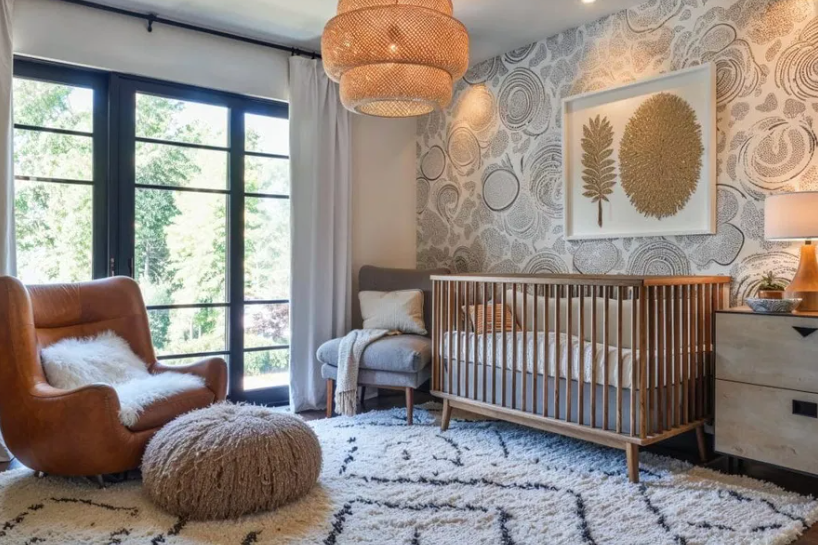
Create Your Baby’s Nursery Like a Pro: Best Online Room Design Tools
Designing a baby’s bedroom is both thrilling and daunting. Parents want a space that feels calm, safe, and functional—but the sheer number of choices can overwhelm even the most organized planner. From color palettes to crib placement, every detail matters. Fortunately, a growing range of online design tools now make it easier than ever to visualize layouts, coordinate décor, and even order personalized items before your baby arrives. The best platforms let you experiment with styles, test furniture placement, and balance aesthetic appeal with practicality—without hiring an interior designer.
Roomstyler 3D Home Planner
Roomstyler has become a favorite among new parents for its realistic 3D modeling features. Users can drag and drop furniture, change wall colors, and instantly see how a nursery layout looks from different angles. What sets it apart is its catalog of real-world brands—so when you find the perfect crib or rocker, you can purchase it directly.
Why it’s great for nurseries:
- Includes hundreds of baby-specific items like changing tables, mobiles, and toy storage.
- Lets you visualize lighting effects, so you can test how natural light interacts with soft pastel tones.
- Offers a community gallery where you can browse thousands of user-generated nursery designs for inspiration.
If you want to plan a cohesive, safety-first nursery without guesswork, Roomstyler is a powerful (and free) starting point.
Planner 5D
Planner 5D combines simplicity with professional-level results. Even with no design experience, you can create floor plans in minutes and switch between 2D and 3D modes to visualize the space. It’s ideal for smaller nurseries because it includes detailed dimension tools—helpful for making sure the crib doesn’t block drawers or windows.
Highlights:
- Extensive library of décor elements for baby rooms, from soft rugs to blackout curtains.
- Mobile app version lets you design on the go during late-night nesting sessions.
- Integration with augmented reality (AR) features allows you to “walk through” the room virtually.
Planner 5D is perfect for parents juggling space efficiency with cozy aesthetics, especially in apartments or shared-room setups.
See also: House Renovation Heartomenal: Redefining Creativity
Modsy Nursery Design Service
For those craving professional guidance without the designer price tag, Modsy offers a hybrid model. You upload photos of your baby’s room, describe your style, and receive 3D renderings created by professional designers. Then, you can tweak the layout and swap products until everything feels right.
Why parents love it:
- Professional feedback ensures your nursery feels balanced, not cluttered.
- Realistic renderings make it easy to imagine exactly how your space will look.
- Modsy partners with reputable baby-furniture retailers, ensuring safe, quality selections.
Modsy bridges the gap between DIY and full-service design, making it perfect for parents who want expert assurance with creative freedom.
Babylist Nursery Design Tool
Babylist isn’t just for registries anymore—their nursery design planner lets you create mood boards and connect them directly to your baby registry. You can test color combinations, compare furniture styles, and even generate a “ready-to-buy” checklist.
Standout features:
- Combines design planning with registry integration.
- Offers curated nursery themes like “Modern Minimalist,” “Whimsical Forest,” and “Vintage Softness.”
- Helps avoid duplicate purchases by syncing with other registry sites.
This is ideal for parents who want to streamline the design-to-purchase process without flipping between dozens of browser tabs.
The Novogratz Design Playground
The Novogratz online design playground provides a creative, boutique-style experience for designing personalized nursery spaces. You can explore curated style guides, mix high-end pieces with budget finds, and learn about color psychology for baby development.
Top benefits:
- Focuses on emotional and sensory design—perfect for stimulating early development.
- Built-in “style labs” let you test how pattern and color influence mood.
- Option to consult a Novogratz designer for customized recommendations.
If you want a stylish nursery that feels editorial yet family-friendly, this tool combines artistry with practicality.
Pottery Barn Kids Room Planner
Pottery Barn Kids’ interactive room planner helps you visualize their furniture in your exact space. You can enter room dimensions, drag in pieces from their catalog, and adjust colors to coordinate with bedding and wall art.
What makes it special:
- Uses accurate product dimensions for easy real-world planning.
- Syncs directly with your Pottery Barn cart for one-click ordering.
- Offers design consultations for free with in-house experts.
It’s the perfect choice for parents who value classic aesthetics and trusted craftsmanship, wrapped in an easy-to-use visual tool.
Wayfair’s Room Planner
Wayfair’s room planner simplifies shopping and visualization at once. You can start with pre-designed nursery templates, swap furniture styles, and save versions of your layout for comparison. It also includes an extensive product filter to sort items by price, size, and color palette.
Best features:
- Access to thousands of affordable nursery pieces and décor items.
- 3D rendering capabilities help visualize texture and scale.
- Collaboration options let partners or grandparents add suggestions online.
Wayfair’s Room Planner is great for families seeking variety, affordability, and fast project turnaround.
👶 FAQ: Designing and Personalizing a Nursery Online
As parents move from layout planning to décor personalization, questions about custom items naturally arise. The following FAQs cover the most popular online tools for creating custom home décor and personalized nursery accessories.
1. What are the best platforms for creating personalized home décor for a baby’s room?
Several design platforms now allow parents to personalize nursery décor without technical skills. Websites like Minted, Shutterfly, and Zazzle offer customizable wall art, name prints, and bedding. These services provide design templates where you can add your baby’s name, birth details, or favorite quotes. They deliver professional-quality prints directly to your door, matching the colors and themes of your room.
2. Which online services offer the highest quality custom-printed home accessories?
If quality craftsmanship is your top priority, Society6 and Etsy stand out. Society6 partners with independent artists, offering prints and textiles on premium materials like organic cotton and sustainable wood. Etsy connects you directly with makers who craft bespoke mobiles, name signs, and keepsake boxes—each made to order, ensuring uniqueness and durability.
3. I want to design my own pillows—what’s the best tool for that?
For custom pillows, Adobe Express provides one of the most intuitive interfaces available. Their pillow designer lets you upload photos, choose patterns, and personalize text effortlessly. The results are print-quality designs ready for ordering or download. It’s an excellent option for parents who want to create sentimental keepsakes or themed nursery décor that feels one-of-a-kind.
4. Are there platforms where I can both design and order personalized décor items in one place?
Yes. Snapfish offers all-in-one experiences where you can design, preview, and order custom décor pieces. You can personalize items like wall calendars, storage labels, or photo canvases, then ship them directly. These platforms eliminate the need for multiple vendors while maintaining design control.
5. Which platform offers the most beginner-friendly custom design experience?
For ease of use, Shutterfly and Adobe Express are the most beginner-friendly. Both offer drag-and-drop editors, step-by-step templates, and guided tutorials. You can start with pre-designed nursery themes or upload your own artwork. The interfaces are intuitive enough that even design novices can create professional-looking pieces in minutes.
Designing a baby’s bedroom should feel joyful, not stressful. With today’s online design tools, you can visualize layouts, experiment with color schemes, and even craft personalized décor—all from the comfort of your home. The key is to combine practical planning platforms like Roomstyler or Planner 5D with creative personalization tools such as Adobe Express or Society6. This approach ensures your nursery isn’t just visually stunning—it’s emotionally meaningful and uniquely yours.